SmartPOS — Restaurant POS & Billing Software
Restaurant billing software for Windows — KOT, tables and GST bills offline
SmartPOS is restaurant billing software for Windows. Orders print as kitchen tickets the moment they are punched, the floor plan shows every running table, waiters take orders on their own phones over your Wi-Fi, and the night closes on a counted drawer — all from the PC at your counter, with no cloud server in the middle.
Windows 10 & 11 · Runs on your own PC · KOT, tables & waiter phones
Download for Windows
Version 1.1.209
Released 23 Oct 2026 · Windows 10 & 11 (64-bit)
✓Nothing leaves the restaurant’s PC — service never waits for the internet
✓KOT on punch, a live floor plan and a counted drawer
✓Waiter phones and the kitchen screen run on your own Wi-Fi
Quick Answer
What is SmartPOS?
SmartPOS is restaurant billing software installed on a Windows PC. It prints kitchen order tickets per station the moment an order is punched, runs a live floor plan of running tables, lets waiters take orders on their own phones over the restaurant’s Wi-Fi, applies GST on the bill, accepts Swiggy and Zomato orders, and closes each shift on a counted drawer. It has no cloud server, so billing keeps working with no internet at all.
What restaurant billing software is meant to fix
Restaurant billing software is judged on two minutes: the rush at nine, and the cash count at midnight. SmartPOS is built for both. Orders reach the kitchen as printed tickets the moment they are punched — split per station, so the tawa is not reading the fryer’s slip — the floor plan shows who has been sitting how long and what they owe, and the shift closes against a drawer counted note by note. It runs on the Windows PC at your counter with no cloud server behind it, which is why a dead broadband line is an inconvenience rather than a shutdown.
- ✕Handwritten order slips misread in the kitchen, so the wrong dish reaches the table
- ✕Billing frozen mid-rush because a cloud POS lost its connection
- ✕Waiters walking back to the counter to punch every round by hand
- ✕Aggregator orders copied off a tablet into the till, with the odd one missed
- ✕Bills cancelled after printing, with cash short at the end of the night
- ✕No honest answer to which hour, which cashier and which dish actually carried the day
What you get with SmartPOS
- ✓Fewer kitchen errors — each station reads its own printed ticket, not someone’s handwriting
- ✓Keep serving through an internet outage, because there is no cloud server to lose
- ✓Orders reach the kitchen before the waiter has walked back to the counter
- ✓Swiggy and Zomato orders land in the same till as the walk-ins
- ✓Close the night with a drawer counted by denomination against what the system expects
- ✓Your menu, bills, guests and staff stay on your own machine
SmartPOS features
Everything below is in the Windows application itself — no browser tab, no monthly dependency on someone else's server.
KOT Printing, Per Kitchen
Every order punched at the counter or on a waiter’s phone prints as a ticket at the station that cooks it, the moment it is sent.
- ✓Kitchen stations you define — tawa, fry, steam, beverages, sweet, cold
- ✓One order splits into a ticket per station automatically
- ✓Second and third rounds print as Round 2 and Round 3 on the same table
- ✓Variations and add-ons print on the ticket line
- ✓Cancelled KOTs recorded against a reason you configure
Kitchen Screen & Waiter Phones
A tablet at the pass and the waiters’ own phones join the counter PC over your Wi-Fi — no app store, no cloud account, no internet.
- ✓Kitchen display with live tickets per station and a timer on each
- ✓Mark a line served, or the whole ticket ready
- ✓Waiters open the same floor plan on their phone and add to the home screen
- ✓A customer display on a second screen at the counter
- ✓All of it over LAN sharing, which is off until you switch it on
Floor Plan & Order Types
Areas laid out as the room actually sits, each table showing covers, minutes seated and what it owes — beside takeaway, delivery and any order type you add.
- ✓Multiple areas — ground floor, first floor, terrace
- ✓Free, running and reserved, with the running total on the tile
- ✓Covers recorded per table and reported as covers per day
- ✓A table opened on one device locks on the others, so two people cannot bill it at once
- ✓Dine-in, takeaway, delivery and custom order types, each with its own taxes and charges
Settlement, Tips & Credit Notes
Close a bill across as many payments as it takes, record the tip separately, and refund against the order rather than out of the drawer.
- ✓Cash, UPI, card, bank transfer and pay-later
- ✓Split payments — a share of the bill at a time, optionally tied to specific items
- ✓Tips recorded against the order, outside the sale
- ✓Cancel or refund an order with a reason, and issue a credit note
- ✓Loyalty points and offers applied before the bill is settled
GST on the Bill
Taxes you name yourself, applied per item or per order, inclusive or exclusive — with your GSTIN and the CGST/SGST breakup printed on the receipt.
- ✓Named tax rates, seeded as CGST and SGST, editable under Settings
- ✓Item-wise or order-wise tax, prices inclusive or exclusive
- ✓Extra charges per order type — packing, delivery, a service charge
- ✓GSTIN and a tax breakup on the printed bill, or one Tax line if you prefer
- ✓A tax report over any date range, exportable
The Drawer, the Day and the Team
The register opens on a counted float and closes on a Z report, and the same application holds staff logins, attendance and payroll.
- ✓Opening float counted in, cash in and out with a reason, safe drops
- ✓Counted by denomination at close, with X mid-shift and Z to finish
- ✓A close can be sent for a manager’s approval before it stands
- ✓Owner, manager, cashier and waiter logins with their own permissions
- ✓Attendance, month sheets, payroll periods and printable payslips
What SmartPOS actually looks like
Real screens from the Windows application, running on sample data \u2014 one for each part of the software.
Punch the order, and the kitchen already has it
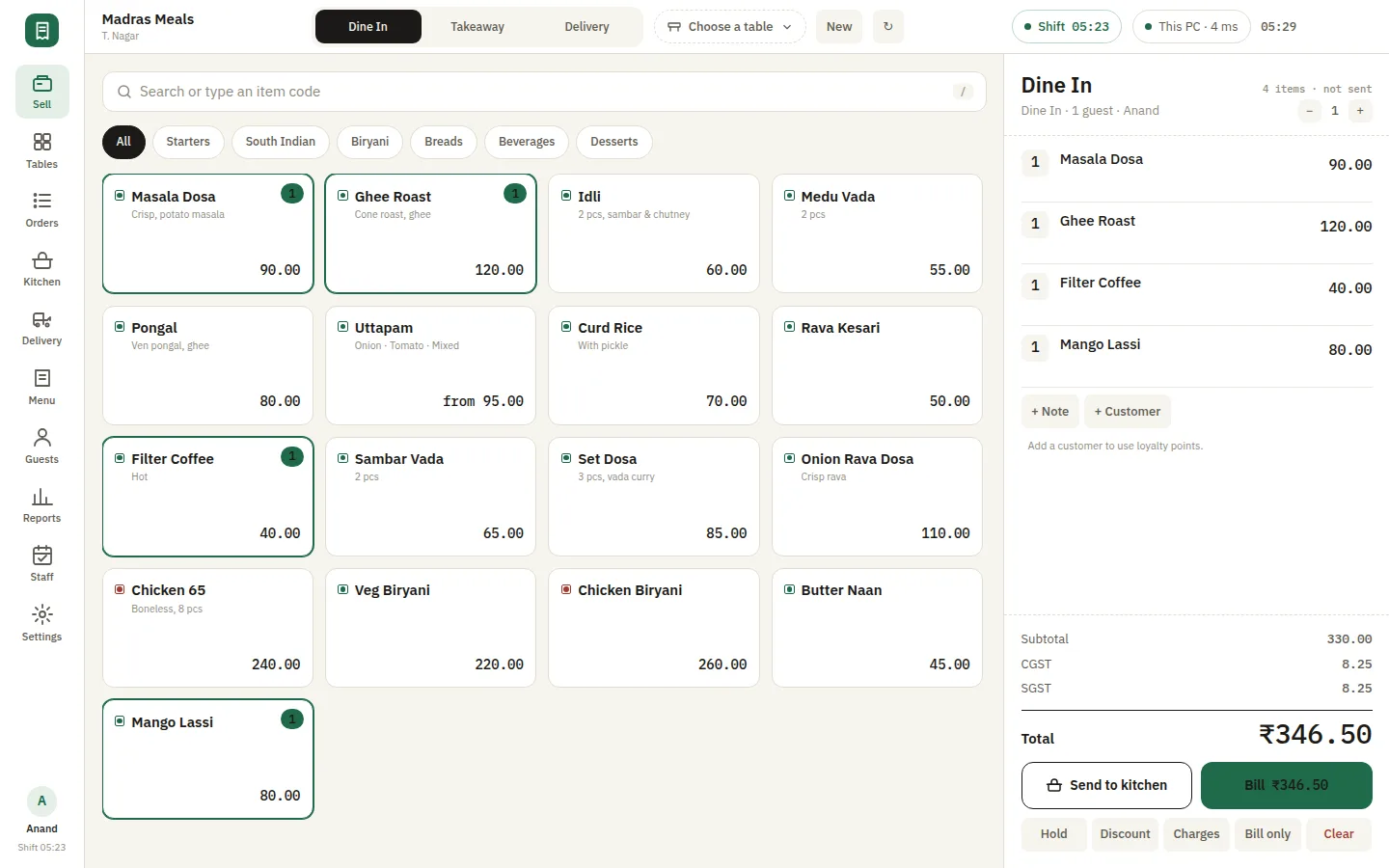
The Sell screen is where the counter lives. Pick the order type, tap through the menu, and send it to the kitchen — the KOT is produced the moment it is punched, not when somebody remembers to print it.
- ✓Dine-in, takeaway and delivery, each taxed and printed per its own order type
- ✓Search or type an item code; variations and add-ons price on the line
- ✓Hold a bill, add a note or a customer, apply a discount or a charge
- ✓CGST and SGST split on the panel before anyone is asked to pay
However the guest wants to pay
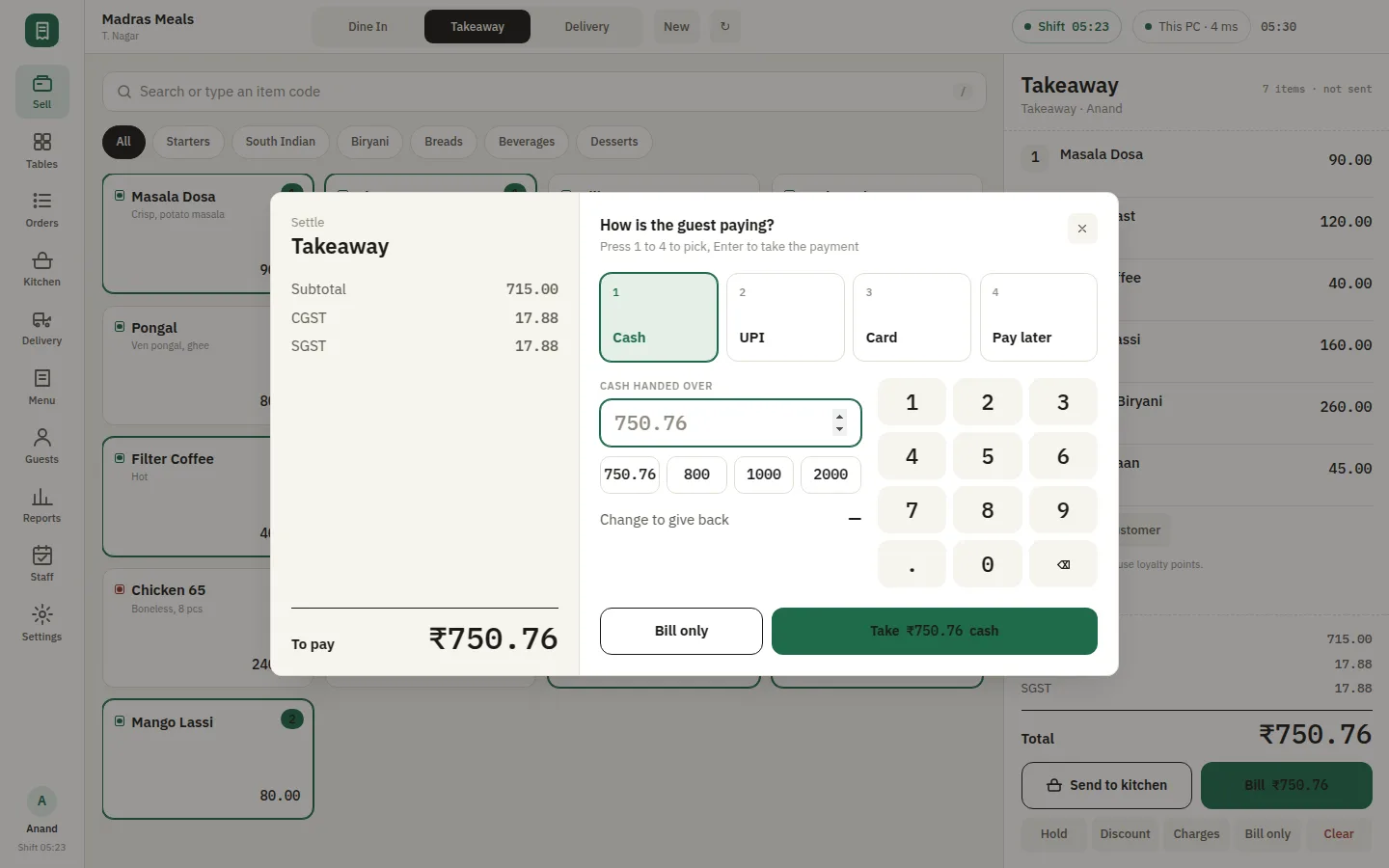
Cash, UPI, card or pay-later, picked with a single key. Cash tendered is counted against the amount payable and the change is worked out, so the person on the till is not doing arithmetic during a rush.
- ✓Number keys 1–4 pick the mode; Enter takes the payment
- ✓Quick tender amounts and a numpad for the note handed over
- ✓Change to give back, calculated as the amount is typed
- ✓"Bill only" prints without settling, for a table still deciding
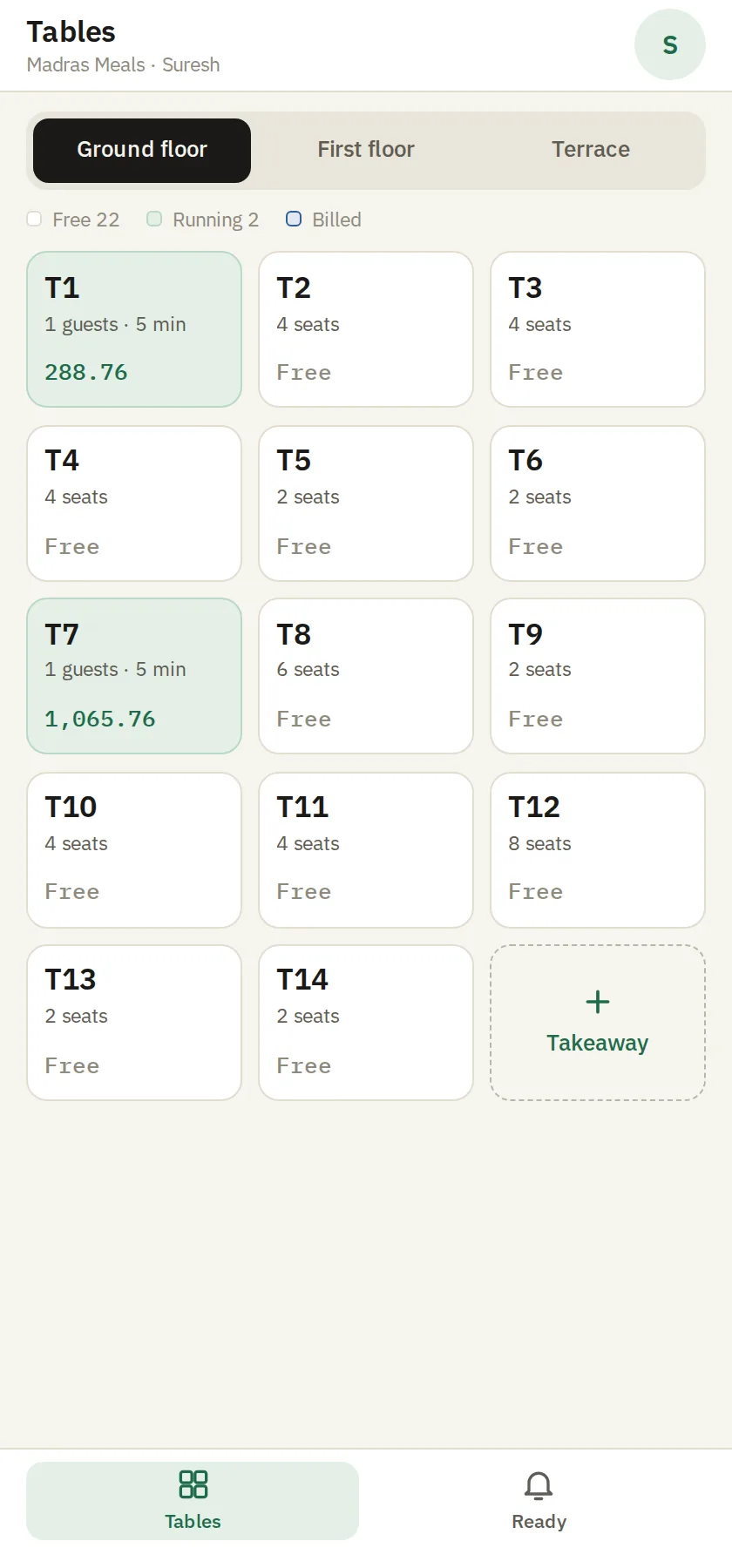
A floor plan that matches the room
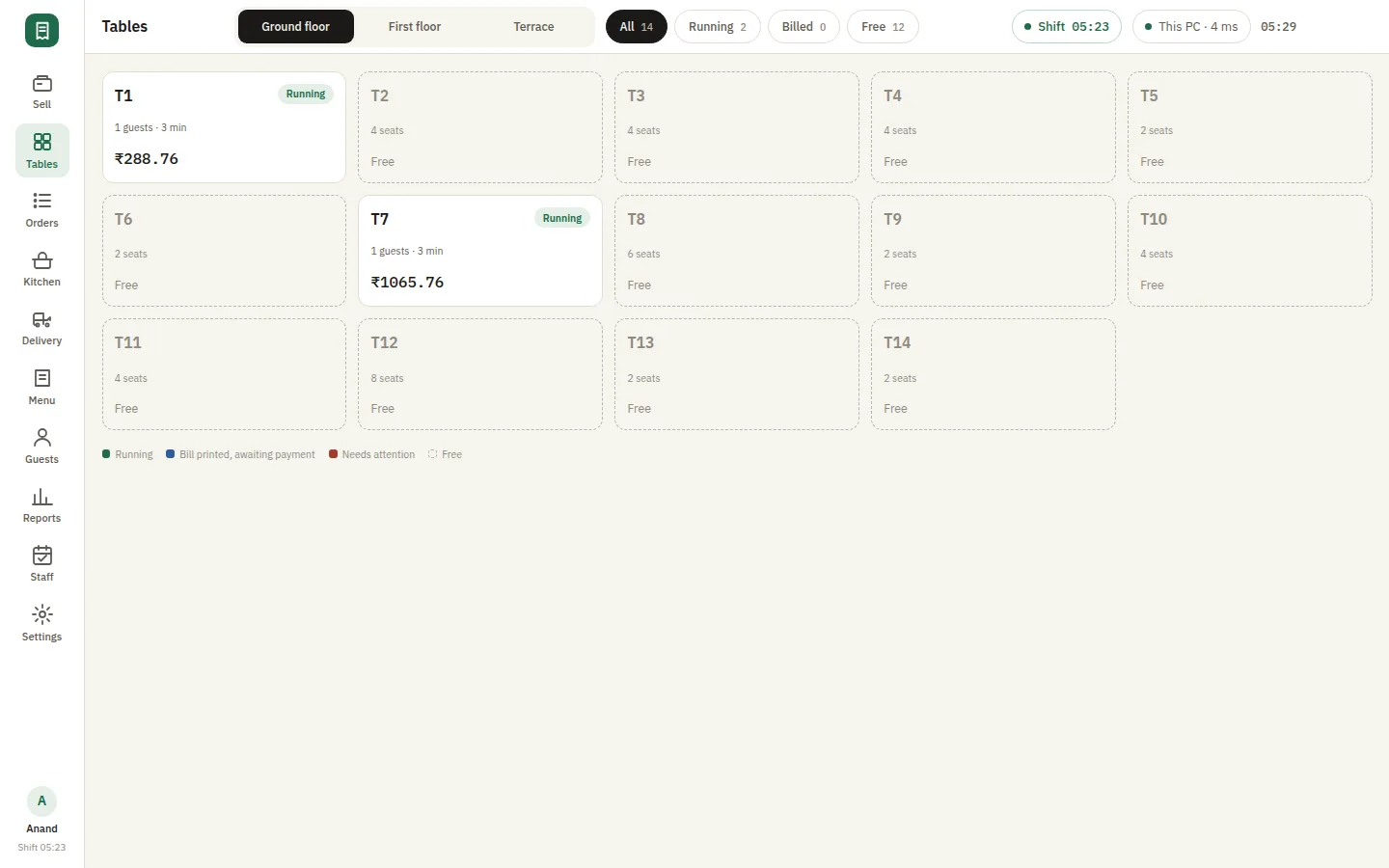
Areas and tables laid out as they actually sit, colour-coded free, running and billed, with the running total and how long the table has been seated. Open an order, add a round, or settle from here.
- ✓Ground floor, first floor and terrace as separate areas
- ✓Running tables show guests, minutes seated and the current total
- ✓Filter to running, billed or free at a glance
- ✓Open the order, add items to it, or settle without leaving the floor
Every station sees its own work
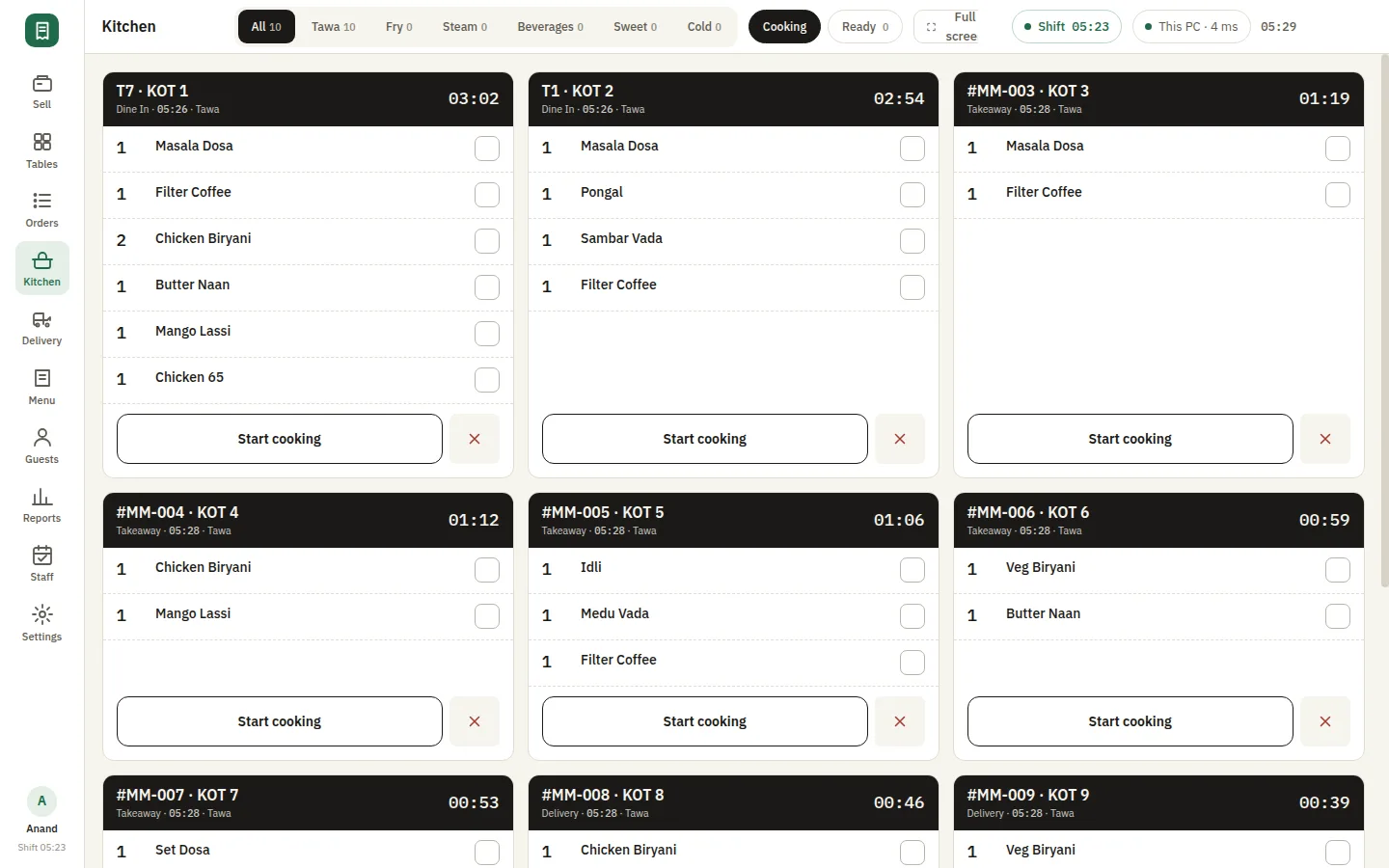
Live tickets on the kitchen screen, routed to the station that cooks them, each with the table or order number and a timer running since it was punched. Tawa does not have to read the fryer’s slip to find its own line.
- ✓Tickets per station — tawa, fry, steam, beverages, sweet, cold
- ✓A timer per ticket, from the moment the order was sent
- ✓Tick lines as they go out; start cooking, then mark ready
- ✓Full-screen mode for a tablet mounted at the pass
The order is taken at the table
Waiters sign in on their own phones over the restaurant’s Wi-Fi and see the same floor the counter sees. The order reaches the kitchen before they have walked back, and the counter never retypes it.
- ✓The same areas, tables and running totals as the counter
- ✓Rounds, so a second and third order on one table stay in sequence
- ✓Added to the home screen, it behaves like an app
- ✓How many phones may be signed in at once is part of your licence
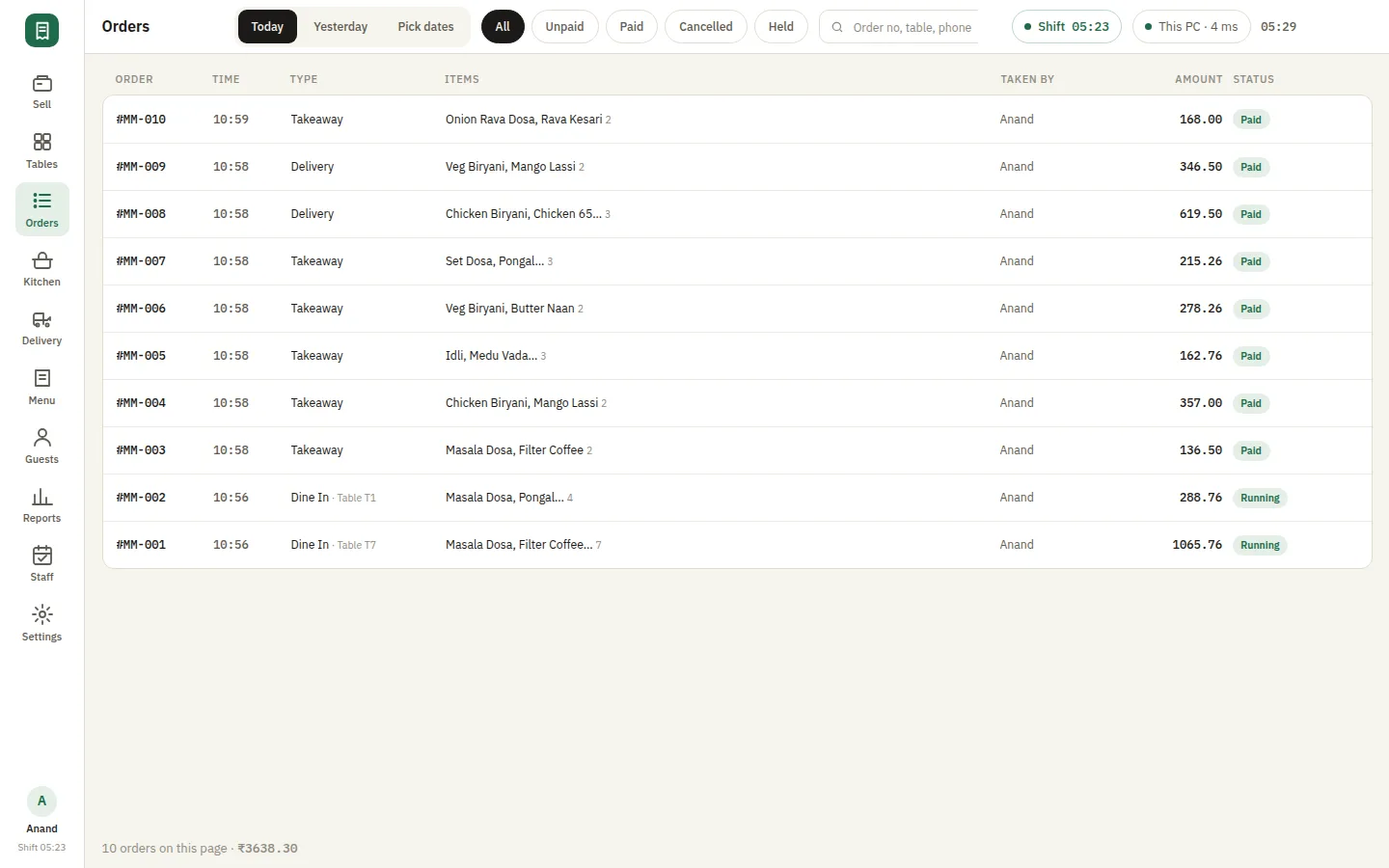
Every bill of the day, and what happened to it
Today, yesterday or any range; all orders or just the unpaid, paid, cancelled or held ones. Reprint a bill, cancel one, or refund against it — with the reason recorded rather than remembered.
- ✓Filter by paid, unpaid, cancelled or held
- ✓Reprint the bill or the KOT for any order
- ✓Cancels and refunds are actions on the order, with a reason
- ✓Dine-in, takeaway and delivery in one list
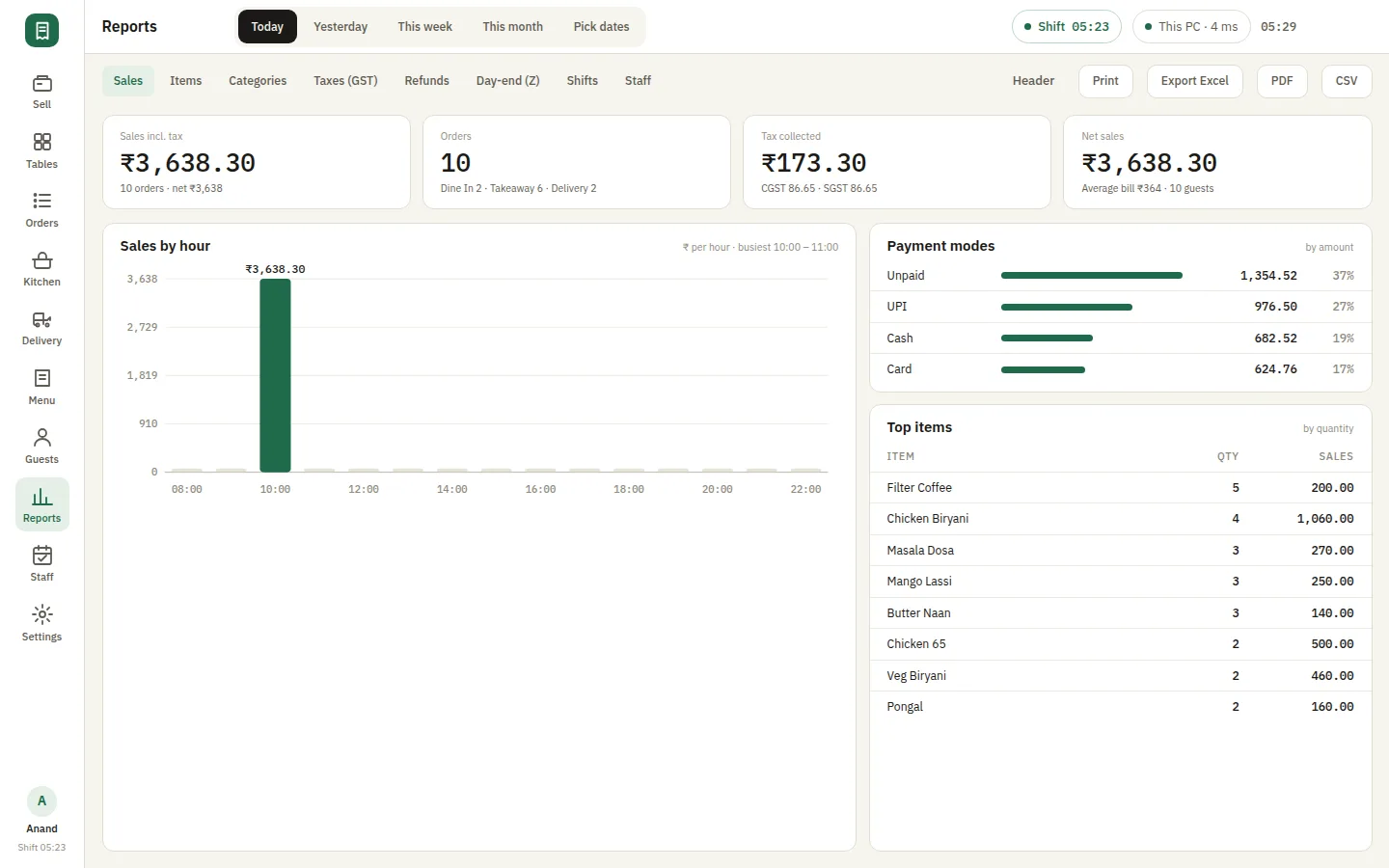
What sold, when, and how it was paid for
Sales by hour against the day, the payment-mode split, and the items that actually moved — over any range, exportable to Excel, PDF or CSV for whoever does the books.
- ✓Sales, tax collected, order count and average bill on one row
- ✓Sales by hour, which is how a rota gets decided
- ✓Payment modes reconciled separately — cash, UPI, card, unpaid
- ✓Top items by quantity and by value
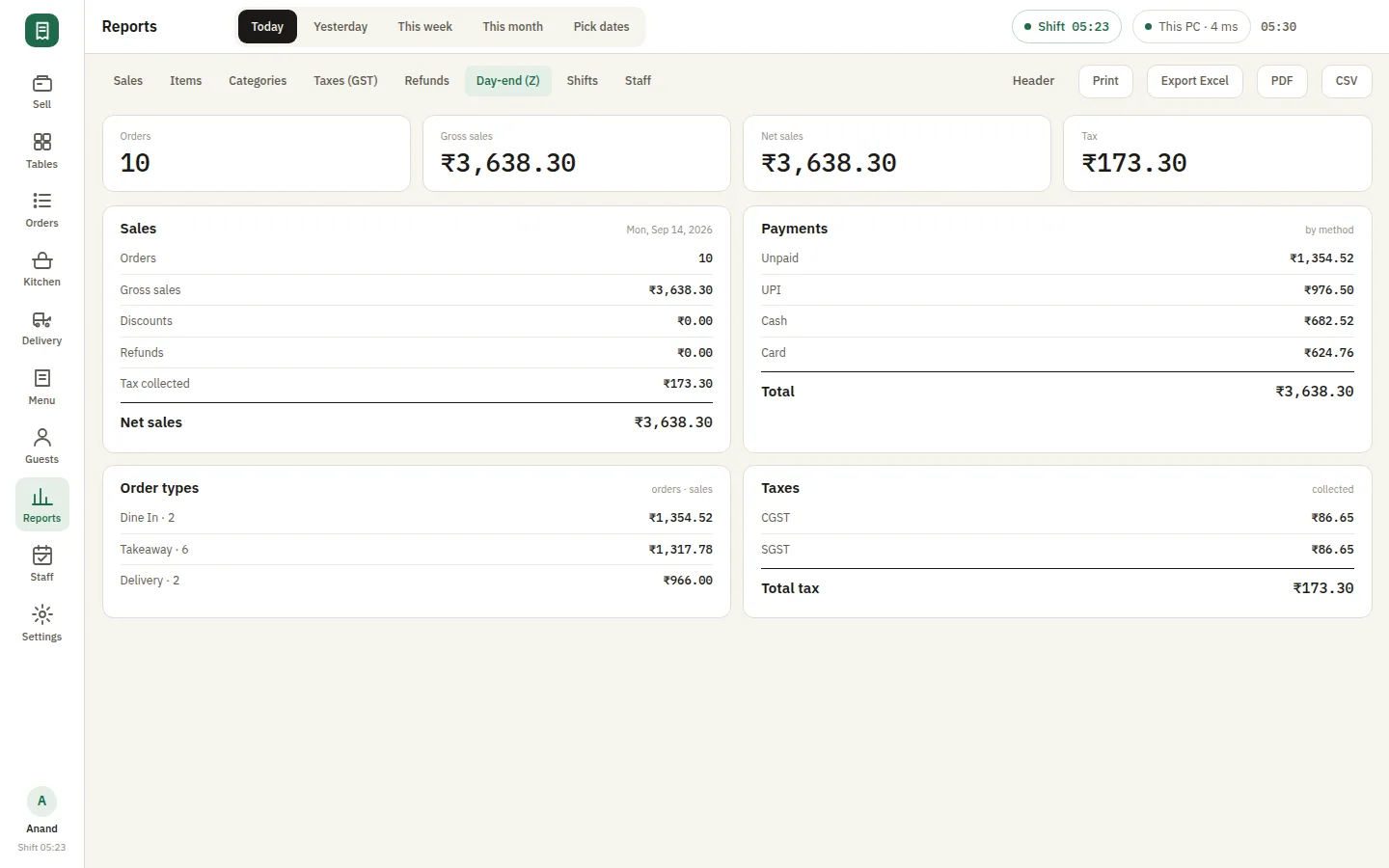
Close against a counted drawer
The register opens on a counted float and closes on a Z report, with cash in and out during service counted too. A difference is on the report at midnight rather than discovered at month end.
- ✓Opening float counted in and attributed to the shift
- ✓Cash in and out during service, each with a reason
- ✓X report mid-shift, Z report to close
- ✓Shift and staff reports alongside it
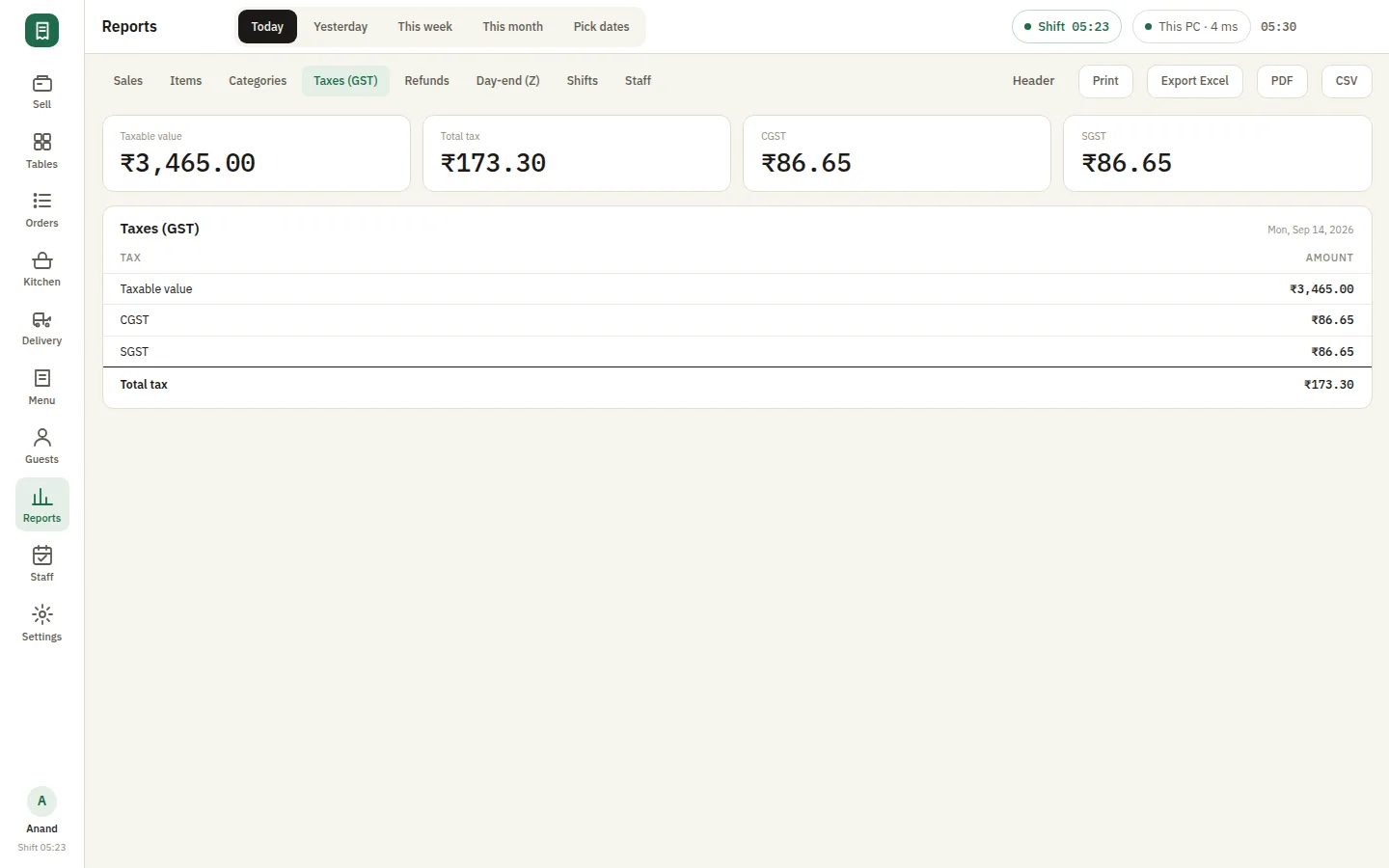
The tax figure, already split
CGST and SGST are applied on the line by the order type and collected on their own report, so the figure handed over at filing time comes out of the bills rather than out of a spreadsheet.
- ✓Tax applied per item and per order type
- ✓CGST and SGST reported separately
- ✓Any date range, exportable
- ✓Refunds and cancels netted off
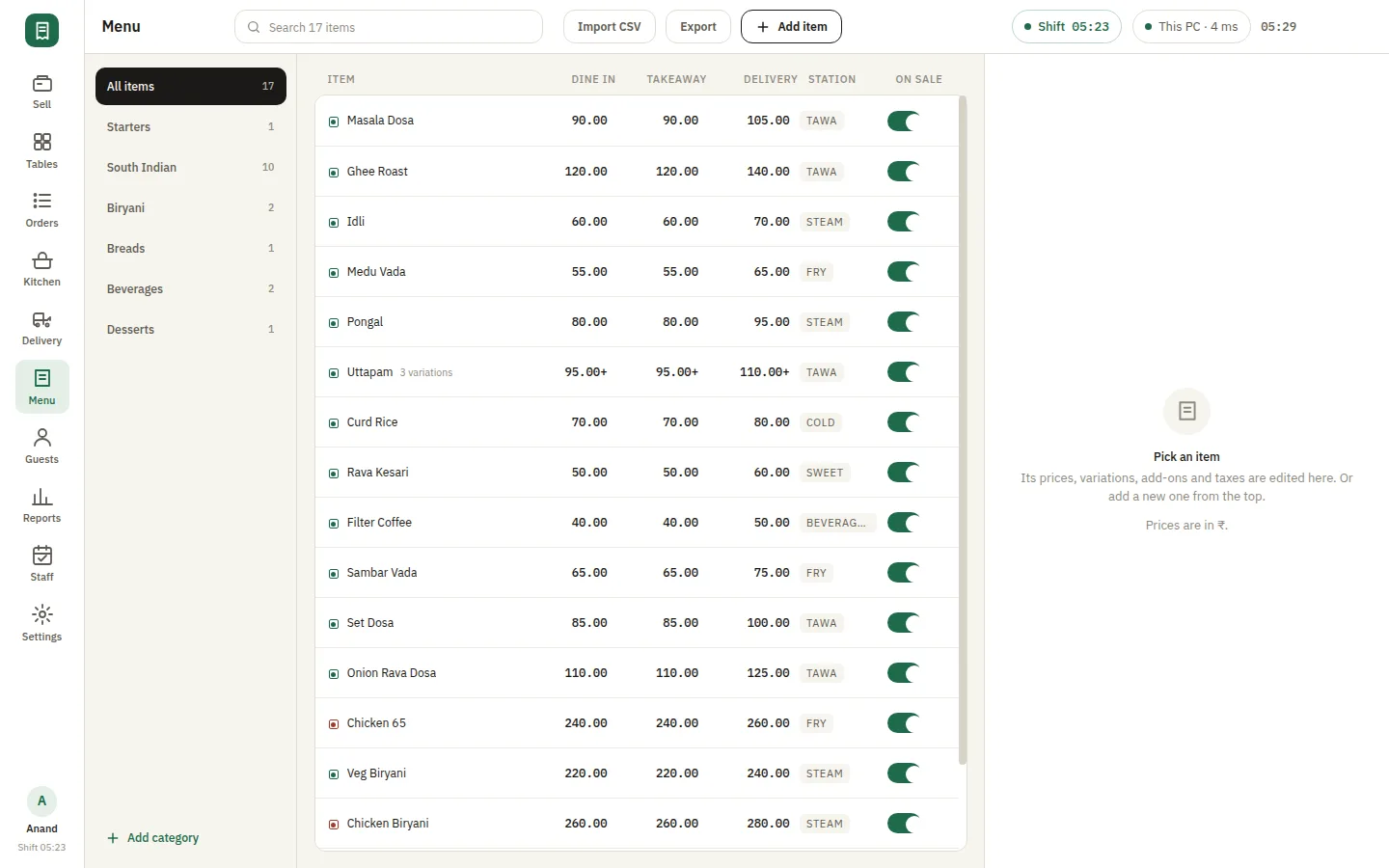
Categories, variations, add-ons and taxes
The menu the counter and the waiter phones both read. Items carry their category, their variations and add-ons, a picture, and the tax that applies — so a half plate prices and prints correctly without anyone doing it by hand.
- ✓Categories, items, variations and add-ons
- ✓Pictures, so a new waiter recognises the dish
- ✓Tax per item, applied by order type
- ✓Import and export by CSV
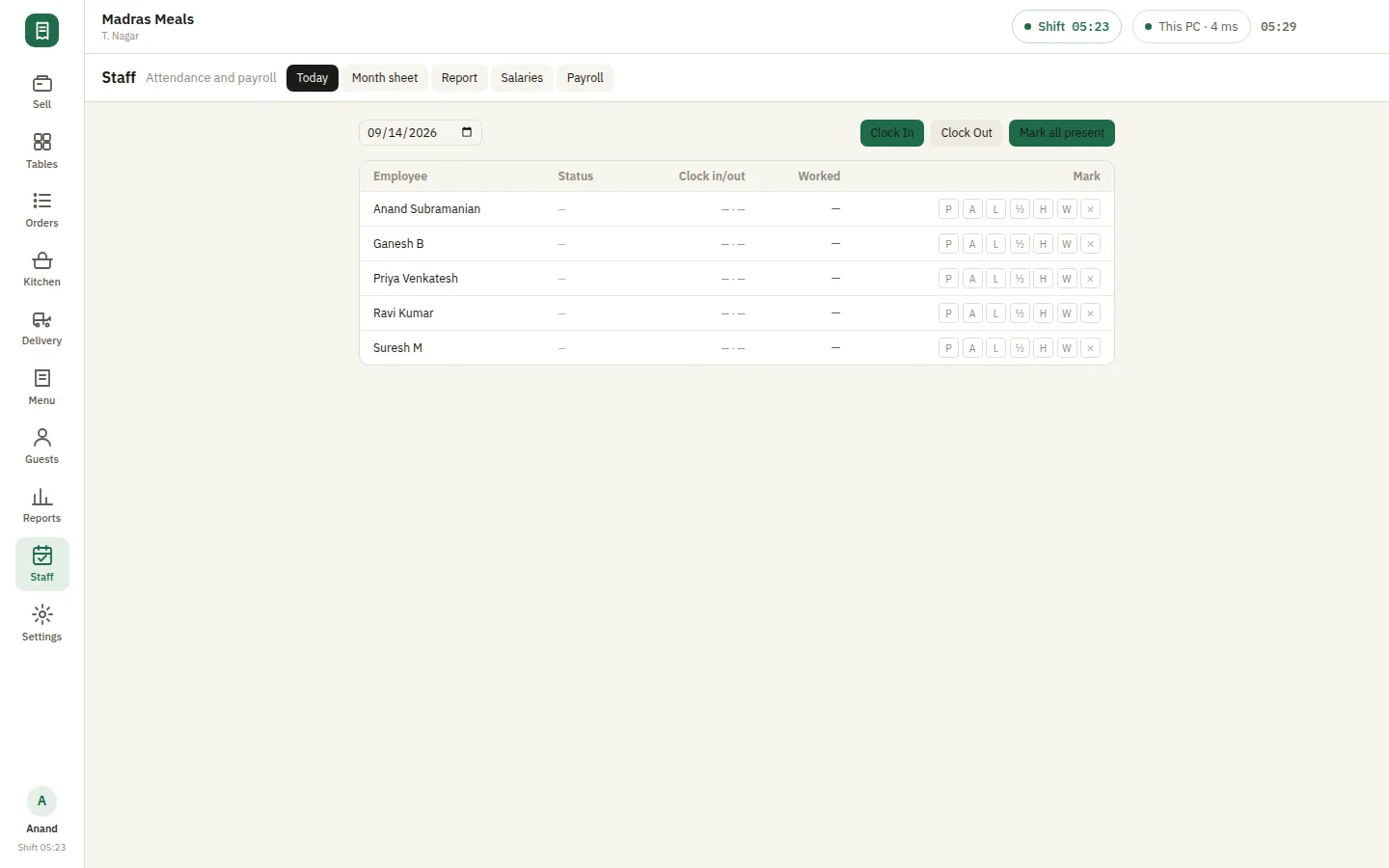
Who may open what, and who was on
Owner, manager, cashier and waiter each get their own login and their own reach. On the plans that include it, attendance and payroll sit in the same application as the till — month sheets, salaries and payslips.
- ✓Separate logins with owner, manager, cashier and waiter roles
- ✓Daily attendance and month sheets
- ✓Payroll periods, salaries and printable payslips
- ✓Staff reports alongside the sales ones
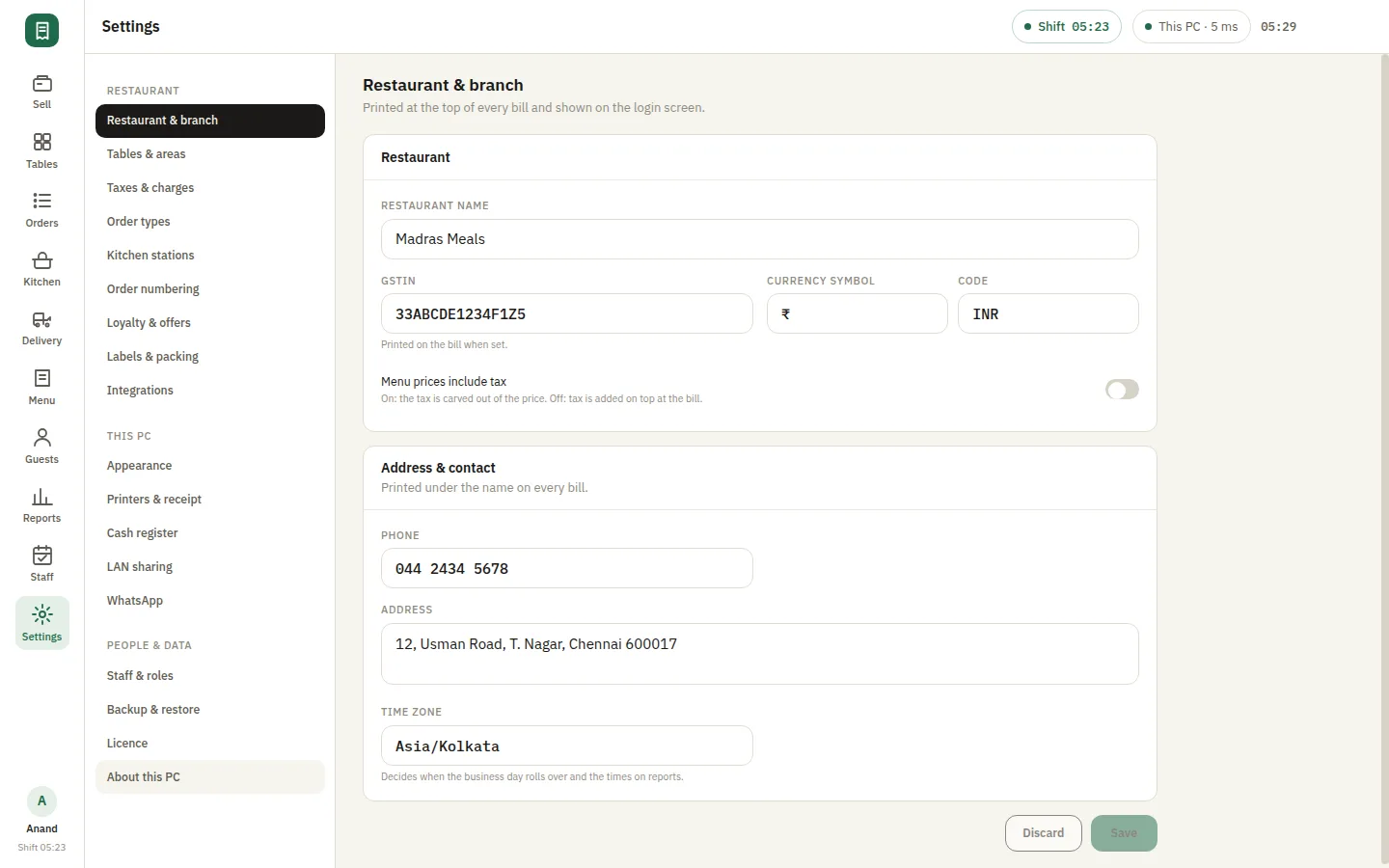
Set it up once, for this restaurant
Restaurant and branch, tables and areas, taxes and charges, printers and receipt layout, order types, loyalty and offers, staff and roles, labels and packing — and LAN sharing, which is what puts the waiter phones and the kitchen screen on your own Wi-Fi.
- ✓Printers per station, and the receipt layout that prints
- ✓Taxes and charges, per order type
- ✓Loyalty, offers, labels and the packing docket
- ✓LAN sharing for waiter phones, the kitchen screen and the customer display
Screens show sample data. The business, customers, products and staff pictured are fictional.
SmartPOS is built for these businesses
From the guest sitting down to the drawer being counted
Restaurant POS software earns its place in the gaps between these steps, where orders and cash normally go missing.
Seat and open the table
The table is opened on the floor plan with the number of covers. The clock starts there, which is what later tells you how long each area actually turns in — and the table locks, so the counter and a waiter’s phone cannot bill it twice.
Punch and print the ticket
Items go to the station that cooks them the moment they are sent, with variations and add-ons on the line. A second round appends to the same running bill and prints as Round 2 rather than starting a new order.
The pass works the ticket
A tablet at the pass shows every live ticket with a timer since it was punched. Lines are ticked off as they go out; the ticket is marked ready when the table’s round is complete.
Settle across modes
One bill can close across cash, UPI, card and pay-later, a share at a time and tied to specific items where guests are paying for their own. A tip is recorded against the order rather than buried in the sale.
Bag it and badge it
Packed orders get a label per container and a packing docket for the counter that bags them, so the right bag leaves with the right rider.
Close the shift
The drawer is counted by denomination against expected cash, cash-outs and safe drops are listed, the Z report closes the day — and a manager can be made to approve the close before it stands.
The reports SmartPOS produces from ordinary billing
You punch orders and take payments. These come out of the same entries, over any date range, exportable to CSV, Excel or PDF.
Sales summary
Orders, covers, discounts, charges, tax, gross and net of credit notes, what is still outstanding, cancelled value and the average bill — on one row.
By hour
Sales and order count per hour with the peak called out, which is how a rota gets decided rather than guessed.
By payment mode
Cash, UPI, card, bank transfer and pay-later reconciled separately, so the drawer is checked against cash rather than against takings.
By item and category
What moved, by quantity and by value, and which part of the menu carried it.
Tax and refunds
Tax collected per rate, and credit notes and refunds listed rather than netted away silently.
Cashier, shift and guest
Takings per cashier, every register session with its variance, and the guests who came back.
SmartPOS vs a subscription cloud restaurant POS
Both bill a table. They behave very differently at nine on a Saturday with a flaky connection — and SmartPOS is deliberately a restaurant till, not a stock system.
| Capability | SmartPOS | Cloud restaurant POS |
|---|---|---|
| Service during an outage | Billing and KOT printing continue normally — there is no cloud server to lose | Billing halts or drops to a limited mode |
| KOT printing | Direct to kitchen printers over your LAN or USB | Via a cloud print bridge that also needs the connection |
| Waiter phones | A web app served by your own counter PC over your Wi-Fi | A vendor app that usually needs the internet |
| Cost shape | A licence per counter PC, with modules you actually use | Per-outlet subscription that rises with your covers |
| Your sales data | On your machine; backups go to a folder you choose | Held by the vendor, exportable while you subscribe |
| Aggregator orders | Swiggy and Zomato through the Dyno service on the same PC | Usually integrated natively |
| Ingredient stock & recipe costing | Not included — SmartPOS is a till, not an inventory system | Often a paid add-on or a higher tier |
| GST returns & e-invoicing | Tax on the bill and a tax report; returns and IRNs are filed elsewhere | Varies; sometimes built in |
SmartPOS pricing
An annual licence per counter PC. Modules are included in a plan or added on; the limits that apply are shown in the application under Settings → License.
Counter
One counter, billing over a till.
Pricing on request
- ✓Sell, Orders and Menu
- ✓KOT printing per kitchen station
- ✓Cash register with X and Z reports
- ✓The full report set with CSV, Excel and PDF export
- ✓Backup to a folder you choose
- ✓Email support
Table Service
The floor, the pass and the waiters’ phones.
Pricing on request
- ✓Everything in Counter
- ✓Tables and floor areas with covers and running totals
- ✓Kitchen screen with live tickets per station
- ✓Waiter phones over your own Wi-Fi
- ✓Guests, credit notes and order history
- ✓Staff logins with owner, manager, cashier and waiter roles
- ✓Phone and remote support
Full House
Everything the application has, on one licence.
Pricing on request
- ✓Everything in Table Service
- ✓Swiggy and Zomato through the Delivery integration
- ✓Loyalty points and offers
- ✓Labels and the packing docket
- ✓WhatsApp bills and webhooks
- ✓Attendance and payroll with payslips
- ✓A second counter PC on the same LAN
- ✓Priority support and onboarding
Prices exclude GST. Implementation, data import and training are quoted separately — ask for a written quote.
What SmartPOS needs to run
It is desktop software, not a browser tab — these are the specifications of an ordinary billing counter PC.
Operating system
Windows 10 or Windows 11 (64-bit) on the counter PC
Processor
Intel Core i3 (8th gen) / AMD Ryzen 3 or better
Memory
4 GB RAM minimum, 8 GB recommended
Storage
2 GB free disk space, SSD recommended
Display
1366 × 768 or higher; touch screens supported
Peripherals
Thermal printer for KOTs and bills (58 mm / 80 mm), cash drawer; waiter phones and the kitchen screen join over your own Wi-Fi
Internet
Not required for service — used for licence check-ins, app updates, Swiggy and Zomato orders, and WhatsApp. Backups go to a folder on your own disk
SmartPOS — frequently asked questions
SmartPOS is Windows restaurant billing and POS software. It prints kitchen order tickets per station, runs a live floor plan of running tables, takes orders from waiters’ phones over your own Wi-Fi, applies GST on the bill, accepts Swiggy and Zomato orders, and closes each shift on a counted drawer. It installs on the PC at your counter and keeps its data there.
Yes, and more completely than most. There is no cloud server: the app talks to a backend running on the same PC, which reads and writes a database file on the same disk. Orders, bills, guests and staff never leave the machine. The internet is used only for the licence check-in, app updates, Swiggy and Zomato orders, and sending a bill on WhatsApp — and none of those can stop you selling.
Yes. You define your stations under Settings, and one order splits automatically into a ticket per station, so the tandoor prints only what the tandoor cooks. Second and third rounds on a running table print as Round 2 and Round 3, variations and add-ons print on the line, and a cancelled KOT is recorded against a reason you configure.
Yes. Turn on LAN sharing under Settings and waiters open the counter PC’s address on any phone on the same Wi-Fi, then add it to the home screen so it behaves like an app. They see the same areas, tables and running totals as the counter, and a round sent from the floor prints in the kitchen before they have walked back. How many phones may be signed in at once is set by your licence.
No, and we would rather say so than let you find out after buying. SmartPOS is a restaurant till: menu, orders, tables, payments, staff and reports. It has no inventory module, no recipe or ingredient consumption, and no liquor or peg-wise measures. If you need food costing, it belongs in a separate system and SmartPOS exports the sales side of it.
No. SmartPOS applies your tax rates on the bill, prints your GSTIN and the CGST/SGST breakup on the receipt, and gives you a tax report over any date range that exports to CSV, Excel or PDF. GSTR-1, GSTR-3B and e-invoice IRNs are not produced by the application — your CA or your accounting software files from the export.
You can split the payment: take a share of the bill at a time, tie each share to specific items if guests are paying for what they ordered, and mix cash, UPI, card and pay-later across the same order. What SmartPOS does not do today is split one table into separate printed bills, or merge and transfer tables — the order stays on the table it was opened on.
Yes, on the plans that include Delivery. Orders arrive through the Dyno service running on the same PC and appear on their own screen, where you accept them with a prep time, reject or mark them ready. The platform name prints on the ticket, and the order lands in the same reports as the walk-ins. Billing works perfectly well without it.
Yes, with the Second terminal module: the second PC connects to the first one’s backend over your LAN, so both counters work in the same tables, menu and orders. There is no separate server product to install and no database to configure — the counter PC is the server.
Windows 10 or Windows 11 (64-bit) on the counter PC, with 4 GB of RAM and 2 GB of free disk space. A thermal 58 mm or 80 mm printer handles KOTs and bills. Waiter phones, the kitchen tablet and a customer display join over your own Wi-Fi and need nothing installed.
Download the Windows installer from the TechSlideITS downloads page and install it on any Windows 10 or 11 PC. A new install comes seeded with a sample restaurant so you can ring an order through immediately. Get in touch and we will set it up with your own menu, kitchen stations, printers and tax rates.
Ready to put SmartPOS on your counter?
Download the Windows installer, or book a free demo and we will set it up with your own data, printers and tax rates.