School Management Software
Students, fees, exams, timetable and a parent app in one system
School management software that runs admissions to report cards on one system — student and staff records, fee collection and dues, exams and marks, an automatic timetable, transport with live vehicle tracking, library, HR and payroll, and a parent app that keeps families informed without a phone call.
Included Modules
Quick Answer
What is School Management Software?
School management software is one system that holds everything a school runs on — student and staff records, fees and dues, exams and report cards, the timetable, transport, and the library — with a parent app so families can see their own child without ringing the office. Ours is built for CBSE, ICSE and State board schools of any size, from a single campus to a trust running several, and it replaces the registers, spreadsheets and WhatsApp groups most schools are still holding together by hand.
We understand your pain points
School management software is one system that holds everything a school runs on — student and staff records, fees and dues, exams and report cards, the timetable, transport, and the library — with a parent app so families can see their own child without ringing the office. Ours is built for CBSE, ICSE and State board schools of any size, from a single campus to a trust running several, and it replaces the registers, spreadsheets and WhatsApp groups most schools are still holding together by hand.
- ✕Fee dues tracked in a register, so nobody knows the real collection figure until month end
- ✕Parents ringing the office for marks, attendance or bus timing that staff then look up by hand
- ✕A timetable rebuilt from scratch every term, and chaos the morning a teacher calls in sick
- ✕Student records in one file, staff records in another, and neither matching the exam sheet
- ✕Report cards assembled in Excel each term, with the errors that come from re-keying marks
- ✕No one answer to where the school bus is when a parent calls at 7:40am
What you gain with School Management
- ✓Know the real fee collection figure today, not at month end
- ✓Cut front-desk calls — parents look up marks, fees and the bus themselves
- ✓Build a clash-free timetable in minutes instead of over a weekend
- ✓Report cards generated from the marks already entered, not re-keyed into Excel
- ✓One record per student and per staff member, used by every module
- ✓Answer "where is the bus?" with a live map
Key features of School Management Software
Everything packed into one connected system, built specifically for your operations.
Student Records
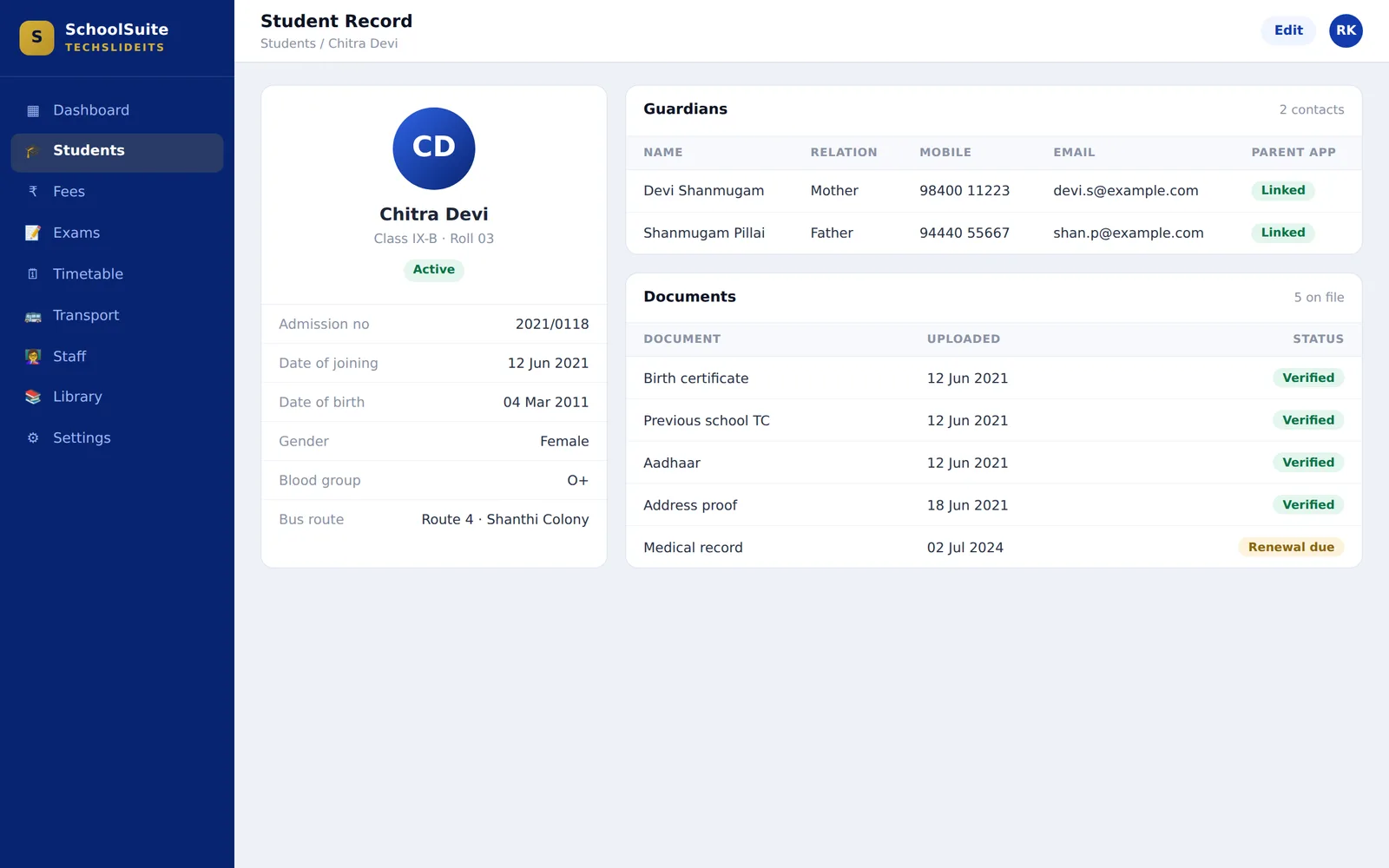
Every student in one place — admission details, class and section, guardians, contact details and documents, from the day they join to the day they leave. It is the record every other module reads from, which is why nothing in the system has to be typed about a child twice.
- ✓Profiles with admission number, class, section, roll and date of joining
- ✓More than one guardian per student, each with their own mobile and email
- ✓Birth certificate, previous TC and other documents held against the record
- ✓Class-wise and section-wise lists you can work from
- ✓The same record drives the fee demand, the exam sheet and the bus route
Fees & Fee Collection
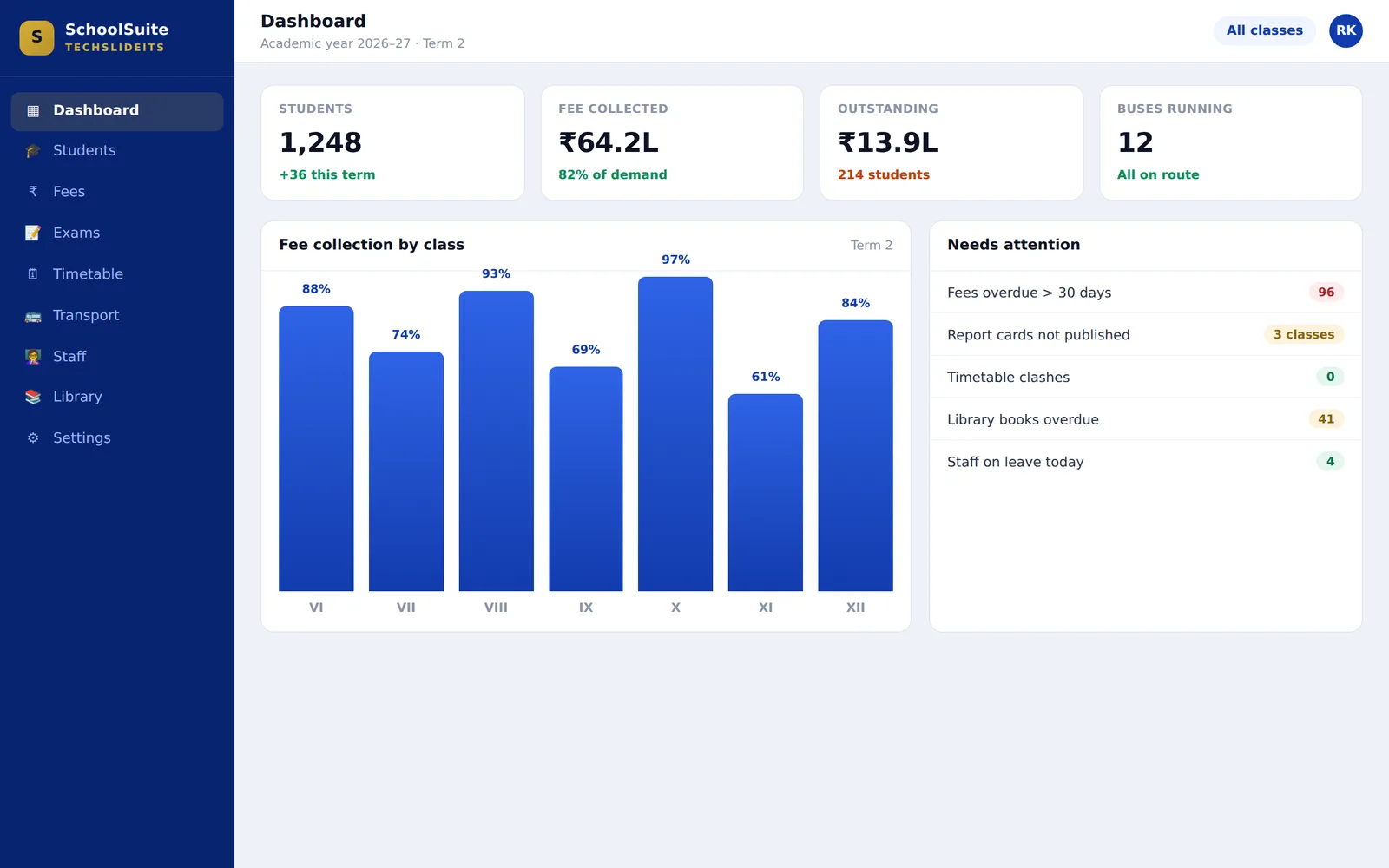
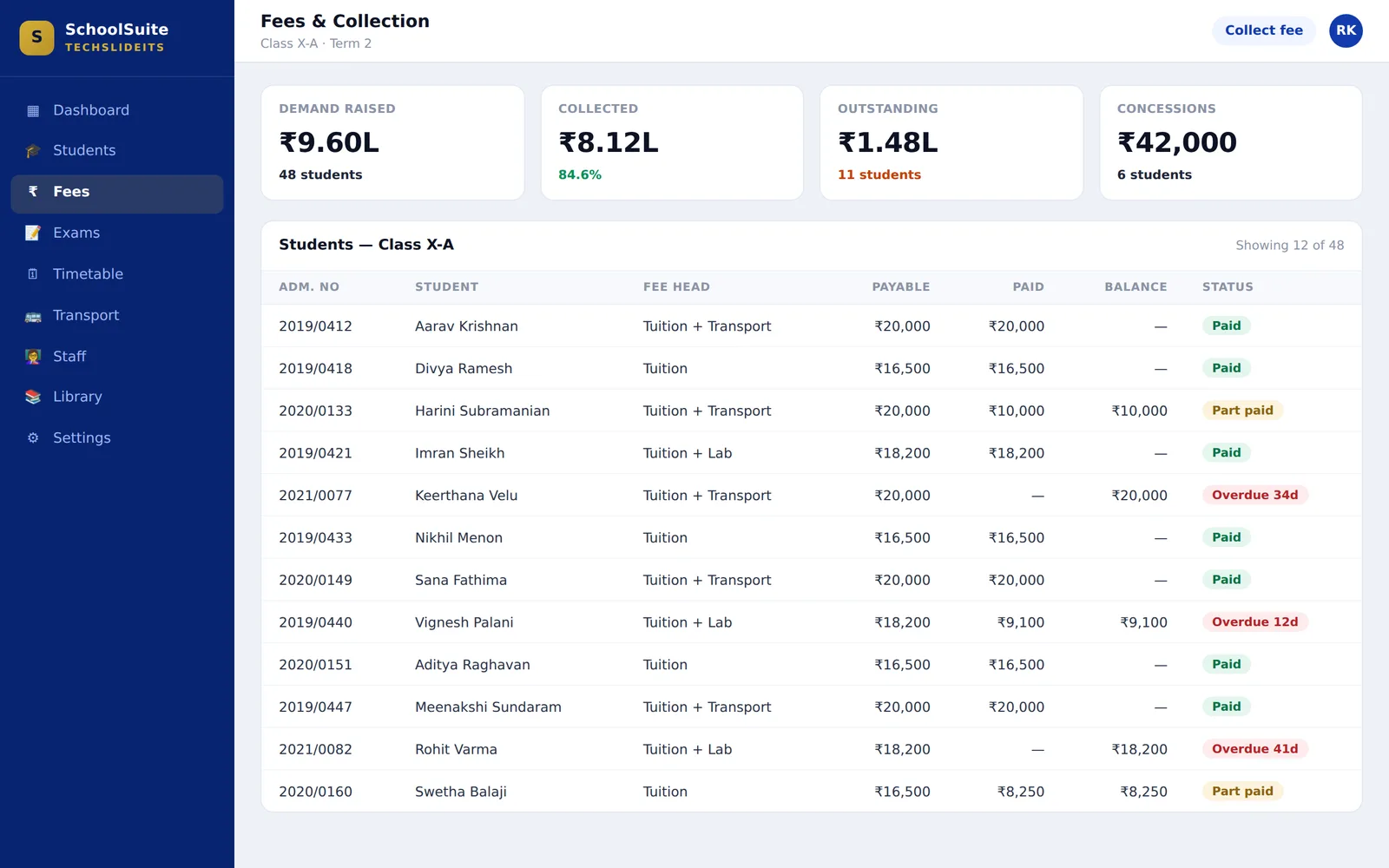
Define the fee structure once, collect against it, and see what is outstanding without anyone totalling a register. The figure on the dashboard is the figure as of this morning, not the one somebody added up at the end of last month.
- ✓Fee heads — tuition, transport, lab — combined into a structure per class
- ✓Demand raised against every student in that class automatically
- ✓Collection recorded with a receipt, part payments included
- ✓Outstanding by student and by class, with how long it has been outstanding
- ✓Concessions recorded against the student rather than adjusted quietly
- ✓Collection reports management can act on
Exams & Report Cards
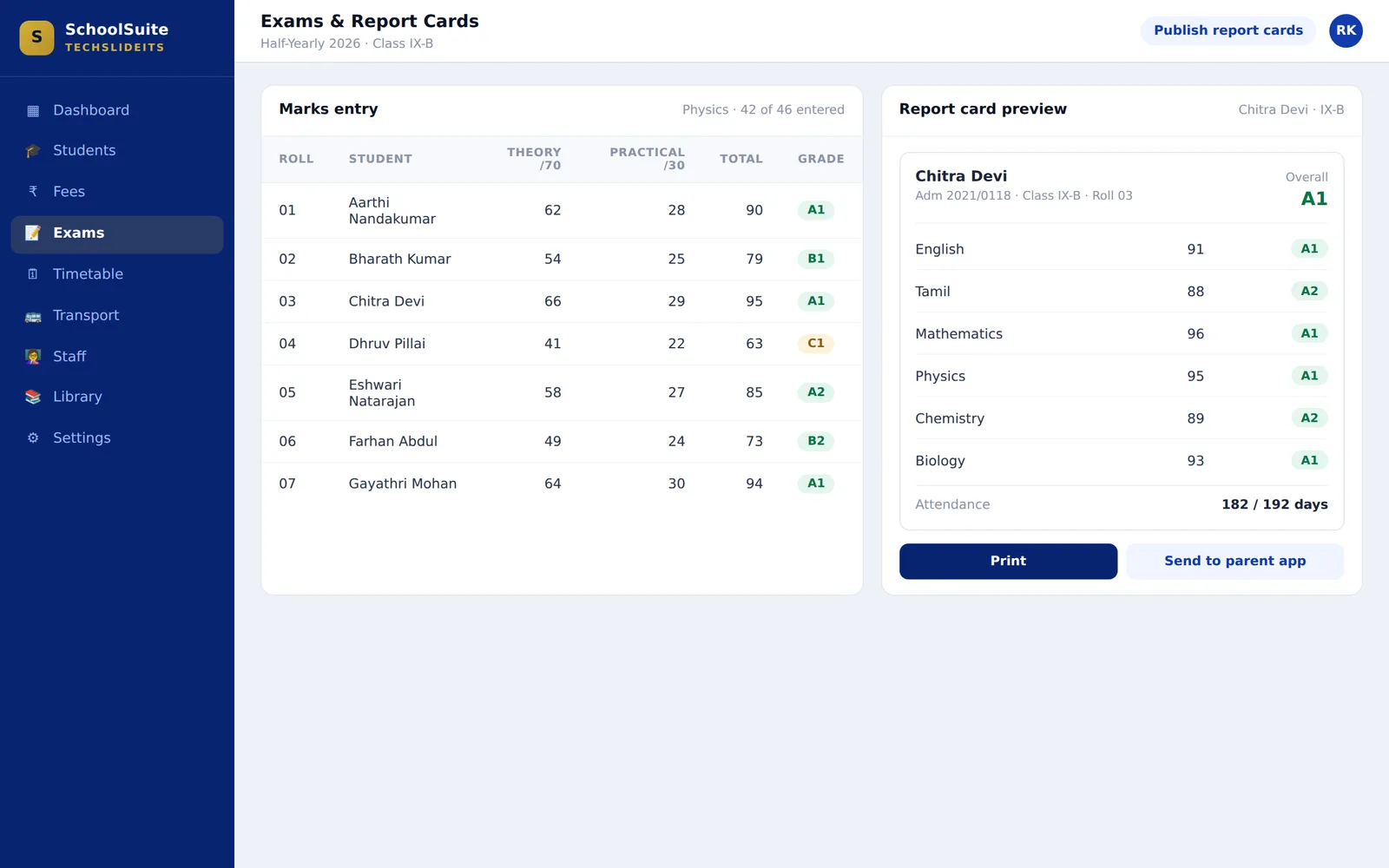
Marks entered once and carried through to the report card, so the sheet the teacher fills and the card the parent receives cannot disagree. No term-end week of copying numbers into a spreadsheet and hoping nobody transposed a row.
- ✓Exams set up with their subjects and maximum marks, theory and practical
- ✓Subject teachers enter their own marks
- ✓Grades and results computed from those marks, to your grading scheme
- ✓Report cards generated per student and printable
- ✓Published to the parent app the same moment they are released
Automatic Timetable
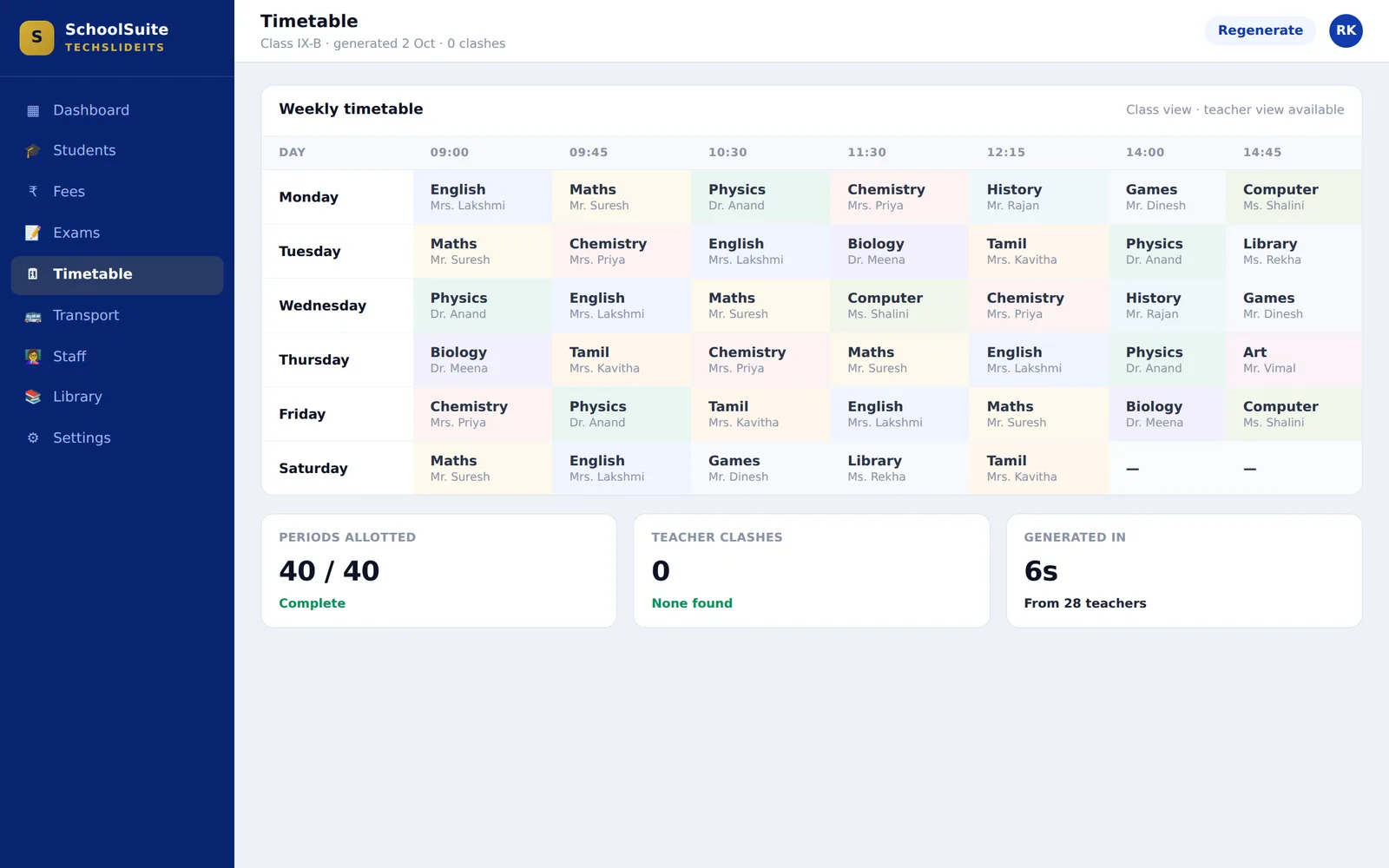
Generate the timetable rather than draw it. Periods, subjects, teachers and classes are resolved together, so no teacher is in two rooms at once and no class is left without one — the work of a weekend, done while you wait.
- ✓Generated from your classes, subjects and teacher allocation
- ✓Clash-free by construction — a teacher cannot be double-booked
- ✓Class-wise view for the noticeboard, teacher-wise view for the staff room
- ✓Printable, and visible to parents in the app
- ✓Regenerate when the staff list changes rather than redrawing by hand
Parent App
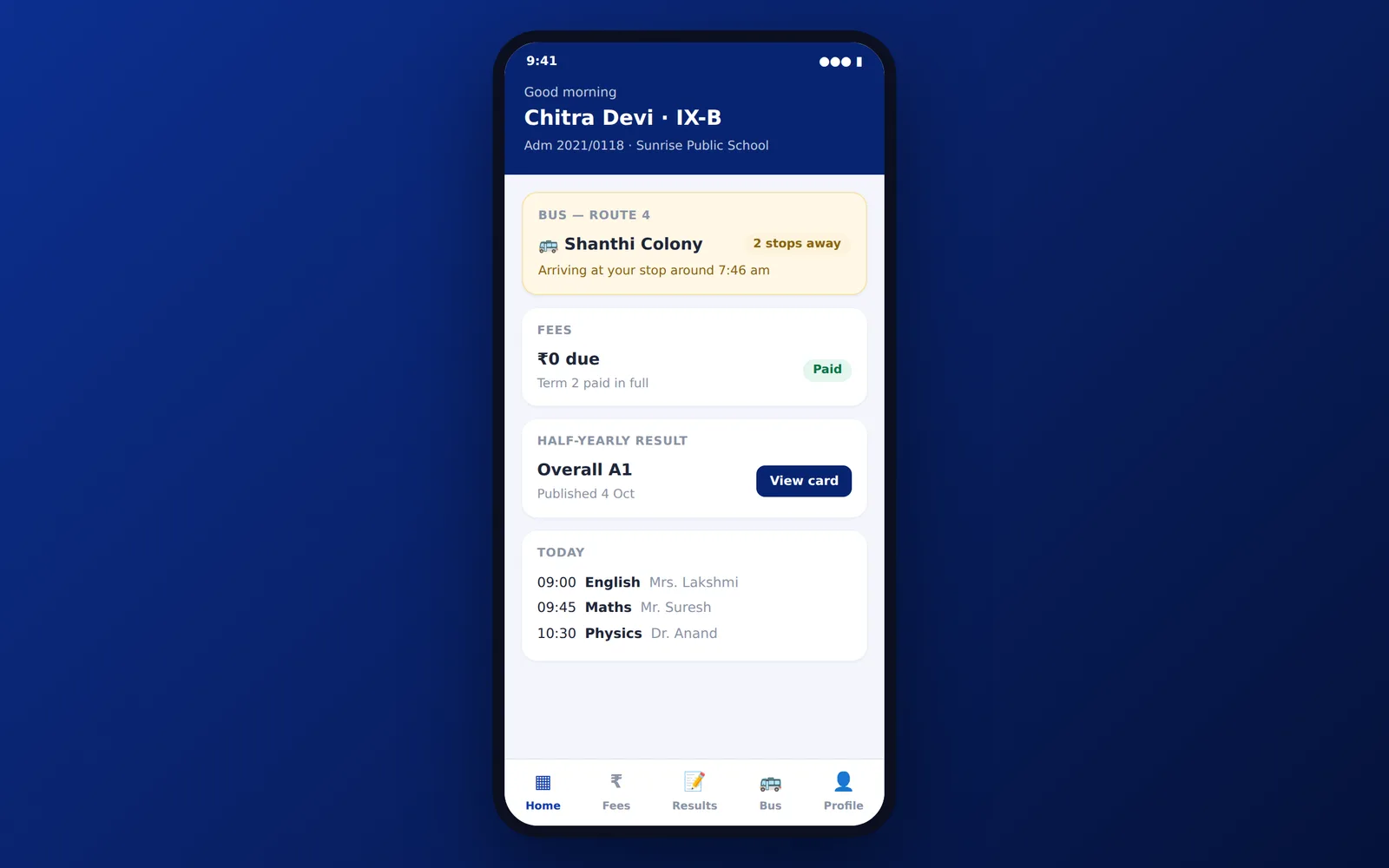
Parents open the app instead of ringing the office — their own child, their own fees, their own bus, nobody else’s. This is the single biggest reduction in front-desk calls a school will see, and the reason the office gets its mornings back.
- ✓Their own child only — a parent never sees another family’s information
- ✓Fees paid and what is still outstanding, with the receipt
- ✓Exam results and the report card as soon as it is published
- ✓Where the bus is on their route this morning
- ✓Today’s timetable, so the right books go into the bag
Transport & Live Vehicle Tracking
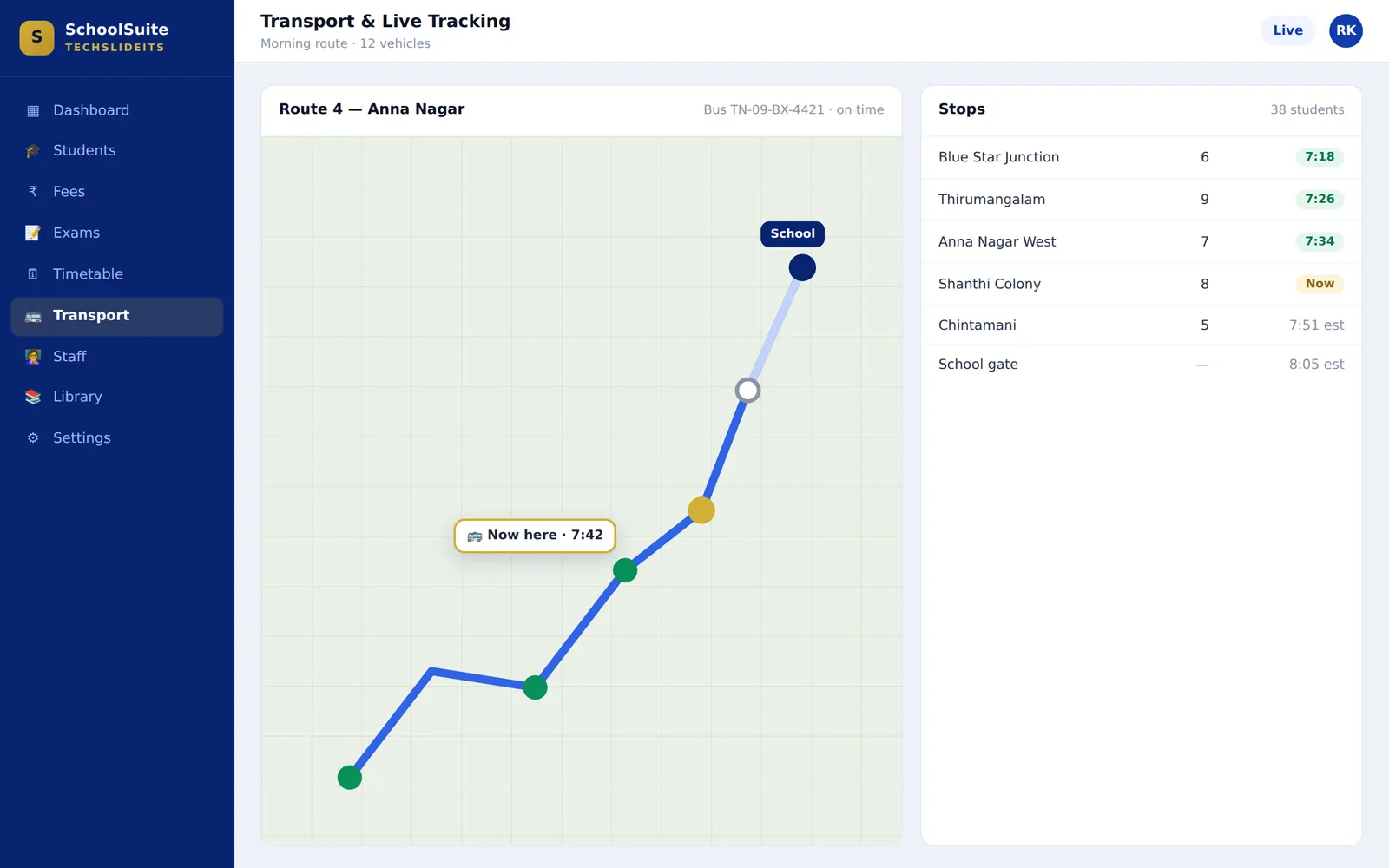
Routes, stops and vehicles managed together, with live GPS tracking so the answer to "where is the bus" is a map rather than a phone call at 7:40 in the morning. Transport fees link back to the student, so a child on a route is billed for it without anyone cross-checking a list.
- ✓Routes built from stops, with students assigned to the stop they board at
- ✓Vehicle records with driver details against each one
- ✓Live GPS position of every vehicle while it is running
- ✓Parents see their own route in the app, not the whole fleet
- ✓Transport fee tied to the student’s route
Teachers & Staff
The staff side of the school held to the same standard as the student side — records, subjects taught, classes allocated and the documents that go with employing someone. It is the same list the timetable allocates from and the same list payroll pays.
- ✓Profiles with designation, department and contact details
- ✓Subjects and classes allocated per teacher
- ✓Documents held against the staff record
- ✓Teaching and support staff on one list
- ✓Feeds the timetable and payroll rather than being retyped into both
HR & Payroll
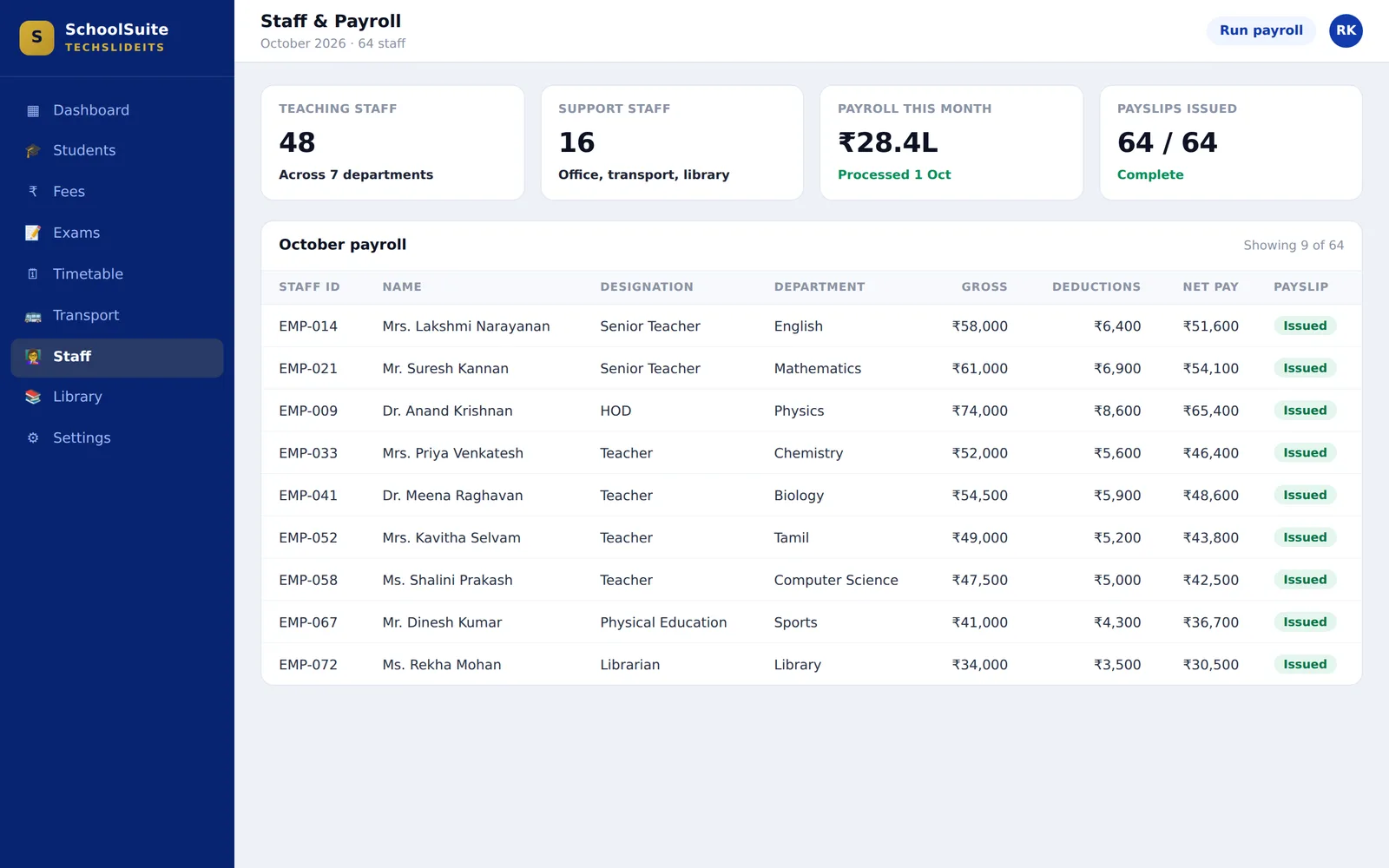
Salaries run from the same staff records the timetable allocates from, so the people side of the school is one system rather than two lists that drift apart. Run the month, issue the payslips, and the figure that leaves the account is the figure the system expected.
- ✓Salary structure held against each staff member
- ✓Monthly payroll processed for teaching and support staff together
- ✓Deductions applied and net pay computed
- ✓Payslips issued per staff member
- ✓Payroll reports for the month and for the year
Library
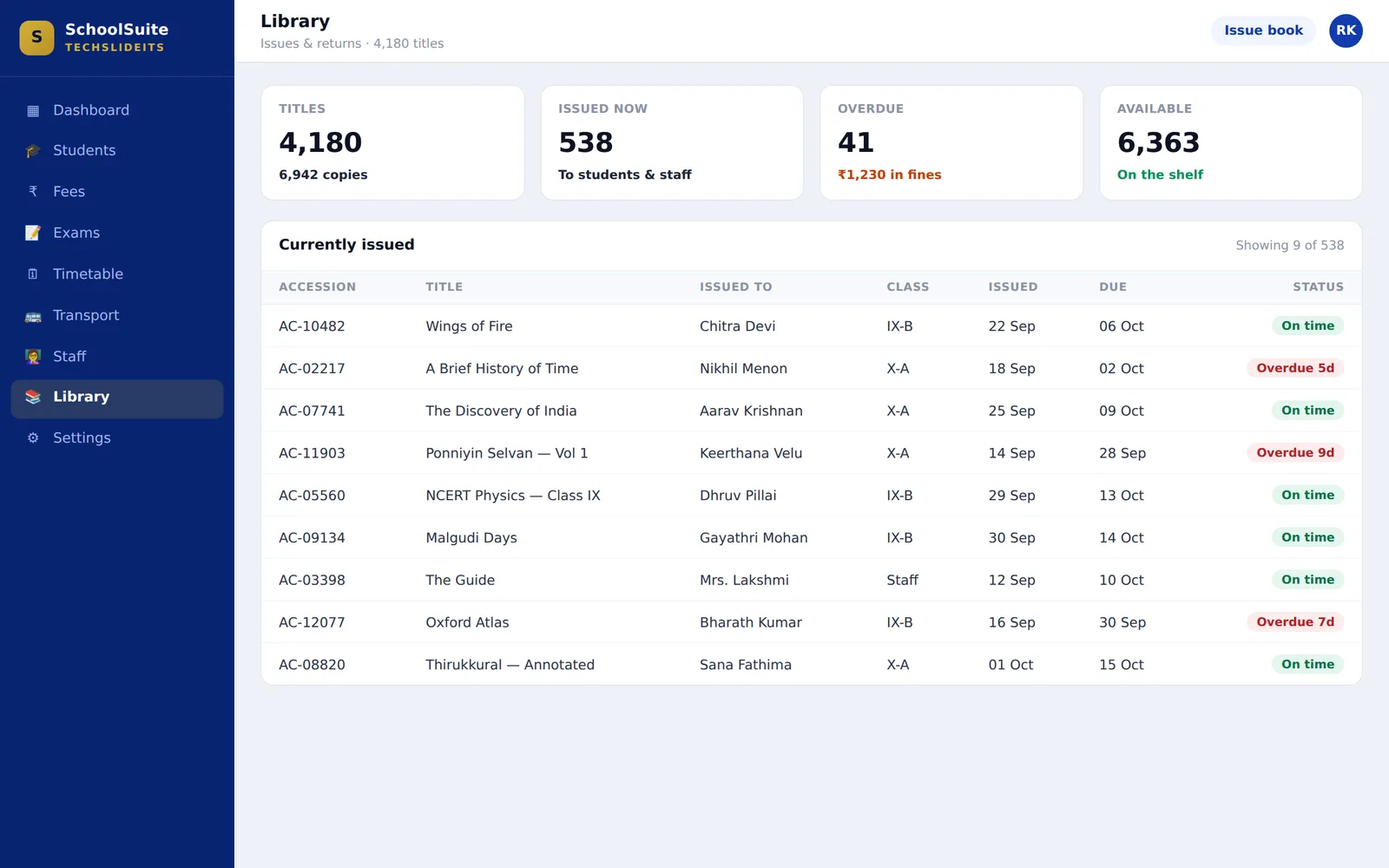
The catalogue, who has what, and what is overdue — without the ledger at the counter and without the librarian being the only person who knows where anything is.
- ✓Catalogue by title with the number of copies held
- ✓Issue and return against a student or a staff member
- ✓Due dates, and an overdue list that does not need chasing to produce
- ✓Fines against the borrower
- ✓What is on the shelf right now, without walking the shelves
School Management on screen
Representative screens of the interface. Book a demo and we will walk you through the working system with your own requirement in front of us.
Built for the way Indian schools actually run
Board, size and structure change what a school needs from its software. These are the shapes this one is built around.
CBSE, ICSE and State board
Exam setup, grading and report cards are configured to your board rather than assumed, so the card a parent receives looks like the one your school already issues.
Single campus or a trust
One school on one campus, or a trust running several — the same system, with each school’s students, staff, fees and timetable kept its own.
Schools running their own buses
Where transport is part of the fee and parents expect to know where the bus is, routes, vehicles and live tracking are part of the same system rather than a separate app.
Schools growing past their registers
The point at which admission numbers, fee dues and staff records stop fitting in spreadsheets is the point this pays for itself.
From admission to report card, on one record
The value is not in any one module. It is that the student admitted in June is the same record on the fee receipt, the exam sheet, the bus route and the parent’s phone.
Admit the student
The admission creates one record — class, section, guardians, documents — and every module below reads from it. Nothing is typed a second time.
Raise and collect the fee
The fee structure for that class applies automatically. Collection posts against the student, the receipt prints, and the outstanding figure updates the same moment.
Generate the timetable
Classes, subjects and teachers go in; a clash-free timetable comes out, viewable by class and by teacher.
Put them on a route
The student is assigned a stop on a route. The vehicle on that route is tracked live, and the parent sees it in their app.
Enter the marks
Subject teachers enter marks against the exam. Grades and results compute from them — no separate mark sheet to reconcile.
The parent already knows
Report card, fees paid, dues outstanding and the bus, in the parent app. The office answers the questions the app cannot, which is far fewer of them.
The questions it answers without anyone preparing a report
A school does not lack information; it lacks it in one place at the moment somebody asks. These come out of ordinary daily use, with no additional work.
Who has not paid, and for how long?
Outstanding by student and by class, with the age of the due. The follow-up list writes itself instead of being assembled from a register the evening before a management meeting.
Where is collection against demand?
What was raised, what has come in, what is still out — per class and for the school. The number is current, so a decision taken on it is taken on today rather than on last month.
Where is the bus right now?
A live position on a route, visible to the office and to the parents on that route. The 7:40am phone call stops because the answer arrived before the question.
Which classes are ready to publish?
Marks entered against each exam and subject, so you can see which report cards are complete and which are waiting on a teacher before the deadline, not after it.
Is the timetable actually covered?
Periods allotted against periods needed, and whether any teacher has been double-booked. A clash is something the system refuses to create rather than something a parent reports.
What is out, and what is overdue?
Books issued, to whom, due when — and the overdue list with fines, without anyone reading back through a counter ledger.
How we roll out your School Management
A structured, low-risk implementation method that gets you live faster — with training and support at every step.
Discover
We study your workflows, pain points and goals across every department.
Design
A tailored ERP blueprint — modules, integrations and a phased rollout roadmap.
Configure & Build
We configure masters, workflows and any custom features to match your business.
Migrate & Train
Safe data migration, hands-on user training and user-acceptance testing.
Go-Live
Guided go-live with on-site/remote support so your team is confident from day one.
Support & Grow
Responsive AMC support, updates and enhancements long after go-live.
School Management that connects to your existing tools
The systems school management businesses actually run — integrated so your data flows in one place.
School Management Software — frequently asked questions
School management software is one system holding everything a school runs on — student and staff records, fees and dues, exams and report cards, the timetable, transport and the library — with a parent app so families can see their own child’s information without ringing the office. It replaces the separate registers, spreadsheets and message groups most schools use today.
Yes. Exams, grading and report cards are configured to your board during setup rather than fixed to one, so the report card your school issues keeps its own format. We confirm the board and the grading scheme before go-live.
Their own child only — records and class details, fees paid and outstanding, exam results and report cards, and transport information for their route. It exists to answer the questions that otherwise become phone calls to your front desk.
Yes. Routes and stops are set up with students assigned, vehicles and drivers are recorded against them, and each vehicle is tracked live on GPS. Parents see transport information for their own route in the app, which is what stops the 7:40am phone calls.
You give it the classes, subjects and teachers; it generates a clash-free timetable rather than making someone draw one. The result is viewable class-wise and teacher-wise and can be printed.
Yes. Fee heads and structures are defined per class, collection is recorded against the student with a receipt, and outstanding dues are reported by student and by class — so the collection figure is current rather than something totalled at month end.
Yes. Staff records carry salary structures, payroll is processed monthly, and payslips are produced. It uses the same staff records the timetable does, so there is one list of people rather than two.
It depends on the number of students and which modules you need, so we quote after a demo rather than publishing a figure that would be wrong for most schools. Book a demo and we will show you the system against your own requirement and give you a written quote.
Setup covers your classes and sections, the fee structure, staff, the exam and grading scheme, routes and the timetable, plus importing your existing student data. We scope the timeline at the demo once we have seen the size of the school and what you are moving from.
Yes — that is part of setup rather than something you do yourself. We take your current student and staff lists in whatever shape they are in, usually a spreadsheet or an export from whatever you use now, and load them with the classes, sections and fee structure already set up so the system is usable on day one rather than empty.
That is what the training is for, and it is included. Most of the school only ever touches one part of it — a class teacher enters marks and takes attendance for their own class, the office collects fees, the librarian issues books. We train each group on their own part rather than putting everyone through the whole system.
We call within one business day to understand the school — board, strength, how many buses, what you use today — and then walk you through the system against that rather than a generic tour. You get a written quote after it. There is no cost and no obligation at any point.
Yes — that is what the demo is for. We walk through the modules with your own requirement in front of us, answer what it does and does not do, and leave you with a written quote. Book one and we will call within one business day.
Pricing depends on modules, users and cloud vs on-premise. Request a free, no-obligation demo and we will tailor a quote to your business.
Other products we serve
School Management across India
Local implementation, training and support for school management businesses — open your city for details.
Ready to transform your School Management operations?
Book a free, no-obligation demo. Our consultants will map your workflow and show you exactly how TechSlideITS ERP fits.